

Table of Contents
ToggleBoth for use in personal or professional activities, mobile apps are the real deal in the present-day world. It is driven by digital technology. It doesn’t matter whether you highly believe in something new that is beyond human imagination. Or just want to bring out your own creativity; creating an app on your own can prove a very rewarding task. This all-embracing guide will take you by the hand. It will teach you how to create your own app. Also, the crucial aspects of developing an application, helping you actualize what you only see in your mind’s eye.
Moreover, create your own app with a clear problem, a simple audience goal, and measurable success points. Today, users expect fast loading, clean screens, and secure sign-ins from the very first tap. Therefore, successful apps now combine useful features, smart design, and reliable cloud support.
Also, modern teams validate ideas early through wireframes, clickable prototypes, and quick user feedback loops. Meanwhile, AI features now help apps search, summarize, translate, and personalize content more effectively. Likewise, adaptive layouts matter because users open apps on phones, tablets, watches, and other screens.
What are the Basics of App Development?
Embarking on your app development journey necessitates a solid grasp of the foundational principles governing app construction. App development revolves around the art of coding, enabling software programs to function seamlessly on mobile devices. Mastery of coding languages like Java, Swift, and Kotlin is imperative, particularly when tailoring your app for specific platforms such as Android or iOS. These coding languages serve as the building blocks. It empowers developers to breathe life into their ideas and craft immersive digital experiences for users. Therefore, these languages lay the groundwork for unlocking the boundless potential of app development.
Planning Your App Development Process
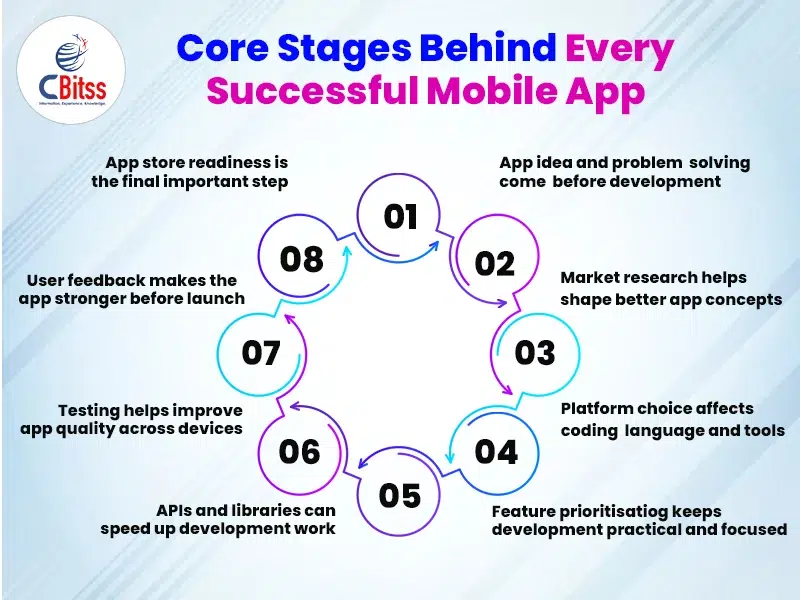
Meticulous planning is vital for the success of a mobile app development project. During this early phase, establish what your app is designed to do and what it intends to solve or satisfy. Gain a proper understanding of market dynamics by studying your target customers. Also, other competitors and other players in your industry are carrying out market research. Use these details as the basis for an in-depth app concept comprising qualities, operations, and user experience (UX) design. Think about creating wireframes or mockups so you can see how your application’s design and changes will happen. Having a good plan, it serves as a compass towards your development. It will direct you at every step during the development process.
Above all, research user pain points before you write code or choose any framework.
Then, map each screen to one action, so users finish tasks without confusion.
In addition, strong onboarding reduces drop-offs and helps first-time users understand value quickly.
Similarly, a clear homepage design strategy improves trust before users even install your app.
Choosing the Right Development Platform and Tools
When developing apps, choosing the right platform and tools is one of the most crucial decisions you will have to make. There are two main platforms by which smartphones operate. Android and iOS have different programming languages. Such as Swift (for iOS) and Java (for Android).
You should also make a decision if you want an app specifically made for just one system. Or if you wish it to be compatible with more than one platform, using technologies like React Native or Flutter. Make this choice in relation to the groups you want to reach. Consider your available finances and time for creating it. Join the Flutter training in Chandigarh to learn how to develop cross-platform mobile applications efficiently.
- Today, Android development strongly favors Kotlin, modern UI patterns, and high-quality testing workflows.
- Consequently, learning to become an Android developer now means understanding design, testing, and deployment together.
- Also, many teams use Firebase for authentication, storage, testing, analytics, and remote updates.
- Furthermore, Firebase now supports AI-powered app features through Gemini-based tools and app workflows.
- Therefore, Python remains valuable for app backends, automation, AI services, and data-driven features.
- As a result, Python training with placement helps learners build APIs, scripts, and intelligent integrations.
- Likewise, best Python training supports machine learning workflows that enrich recommendation and chatbot features.
- Meanwhile, PHP still powers many web panels, admin dashboards, and content systems behind mobile apps.
- Hence, the benefits of PHP training include faster backend understanding for app-linked websites.
- Moreover, PHP certification importance adds credibility when you manage app panels and database-driven services.
Besides, cloud platforms like Microsoft Azure basics help teams host APIs, databases, and scalable services.
Integrating Essential Features and Functionality
After you have made a solid foundation for the app, you can now start adding the main functions that the app will have. This can also involve such aspects as user authentication, data storage, social sharing, push notifications and even in-app purchases. It is crucial that you prioritize these features according to their significance. It should be in relation to your app’s general worth and consumer experience. Decompose more prominent features into slighter duties or customer narratives. This makes it simpler to manage and monitor your progression. You can hasten development and improve functionality by using external services’ APIs and libraries.
Step-by-step guidance to launch your first mobile application.
Testing the Quality of your App
Testing is a critical phase of app development. It ensures that your app works as intended and gives a smooth experience for everyone who interacts with it. To do this, the first step is to carry out unit tests. It is so that you can check if the various parts or modules are working okay. After that, proceed with integration testing. You can verify how different sections within your application interact with one another. Feedback of real users on unmodified information systems is gathered during user acceptance testing. Revise your application on the basis of these comments until you make the required corrections and enhancements. Do not forget to check if your application is compatible and reliable across various devices and operating systems.
Launching Your App on Various Platforms
Now you have learnt how to create your own app. It is now possible to deploy your app to respective app stores (e.g., Apple App Store, Google Play Store) for users to download and use. You will get this result after months of hard work and dedication. Preparation for the app store submission can start. One needs to ensure that it meets the guidelines and requirements for the platform’s app store submission.
Stay competitive in growing mobile app development industry.
Latest App Development Trends
- Now, many apps use serverless and microservices to scale features without managing one large system.
- Consequently, developers ship updates faster because smaller services simplify testing, deployment, and debugging.
- Also, secure architecture matters because users now expect privacy, safe payments, and protected personal data.
- Therefore, cybersecurity in design should shape login, storage, APIs, and user permissions early.
- Meanwhile, app teams use App Check, security rules, and role-based access to protect backend resources.
- In contrast, weak security can damage trust even when an app looks polished.
- Furthermore, teams track crashes, performance, and feature behavior before a full public launch.
- Thus, beta testing on real devices helps developers fix speed, layout, and compatibility issues sooner.
- Also, new Play submissions now target Android 15, and older targets reduce visibility on newer devices.
- Likewise, Apple review rules strongly emphasize privacy, safety, consent, and responsible chatbot experiences.
- Finally, developers should plan updates early because store rules and user expectations change quickly.

Conclusion
In conclusion, great apps succeed when they solve one problem clearly and improve through steady testing. Ultimately, combine design, coding, cloud tools, and security to build an app that users trust. Therefore, keep learning, keep testing, and release updates that match current platform standards.
Well done! You’ve successfully navigated the complex path of creating an app all by yourself. Although it may have been challenging at various points, what you’ve learned will be invaluable for the future. Whether embarking on a personal project, starting a startup, or expanding an existing one. Android training in Chandigarh will provide important background information that can be used in developing applications. Always remember that as the world of mobile technology evolves, success relies on innovation and creativity. This is how to create your own app.

Sukhamrit Kaur
Sukhamrit Kaur is an SEO writer who loves simplifying complex topics. She has helped companies like Data World, DataCamp, and Rask AI create engaging and informative content for their audiences. You can connect with her on LinkedIn.